Beyond the Maker Bench: Deploying Raspberry Pi CM4 and CM5 in Industrial Automation
Intermediate, PiShop, Platforms, Raspberry Pi, Resources, Review, Skills, Tutorial Automation, CM4, cm5, compute module 5, engineering, raspberry pi, Tech 0
For years, Raspberry Pi was viewed primarily as a learning tool and a maker’s playground. However, the release of the Compute Module (CM) series, most notably the CM4 and CM5, fundamentally shifted that perception.
By stripping away consumer ports like standard HDMI and USB-A, and breaking out processor interfaces via high-density board-to-board connectors, Raspberry Pi created an enterprise-grade System-on-Module (SoM). Today, industrial engineers are deploying CM4 and CM5 modules directly onto factory floors to power edge computing gateways, programmable logic controllers (PLCs), and smart monitoring systems.
1. The Compute Module Ecosystem: CM4 vs. CM5
To understand why the Compute Module is taking over industrial applications, it helps to look at how the architecture has evolved.
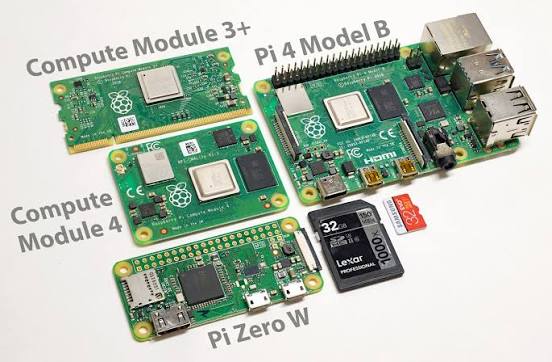
Raspberry Pi CM4: Built around the Broadcom BCM2711 quad-core Cortex-A72 processor, the CM4 introduced optional onboard eMMC flash storage (replacing unreliable MicroSD cards), optional onboard Wi-Fi/Bluetooth with an external antenna connector, and native PCIe Gen 2.0 expansion.
Raspberry Pi CM5: Upgrading to the Broadcom BCM2712 quad-core Cortex-A76 architecture, the CM5 offers up to 2–3x processing performance over the CM4. Crucially for industrial automation, the CM5 expands PCIe capabilities (PCIe Gen 2.0/3.0 via RP1 I/O controller), improves thermal dissipation efficiency, and offers higher RAM capacities, making it ideal for local machine vision, edge AI inference, and high-speed data acquisition.
2. Carrier Boards: Customized Industrial Interface
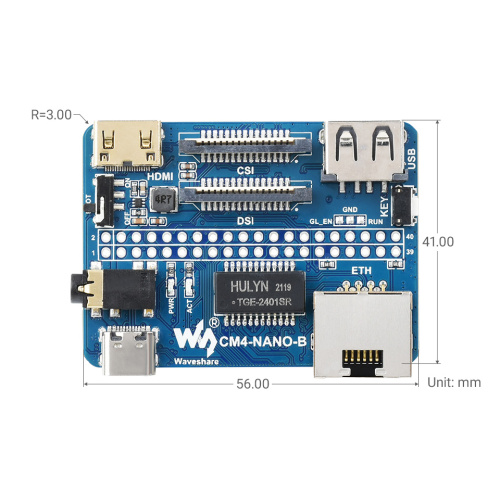
Because the Compute Modules lack standard IO ports, it needs a carrier board to route signals to physical connectors. Instead of using fragile breadboard or consumer-grade USB hubs, industrial deployment relies on two primary carrier board strategies:
Off-the-Shelf Industrial Carrier Boards
Manufacturers like WaveShare, Seeed Studio, and Kunbus produce ruggedized baseboards. These boards convert the CM’s pinouts into standard industrial interfaces:
Power Supply: 12V–24V DC wide-input power rails with surge protection.
Storage & Expansion: M.2 NVMe slots over PCIe for high-end logging or edge AI accelerators (e.g., Coral TPU).
Communication: Dual Gigabit Ethernet, isolated RS485/RS232, and CAN bus connectors.
Custom Carrier Boards
For high-volume production, OEMs design custom PCBs. This allows engineering teams to drop unnecessary features, shrink enclosure dimensions, and integrate proprietary sensor interfaces or physical connectors tailored to specific factory machinery.
3. Industrial Control in Action: Kunbus Revolution Pi
One of the strongest proofs of the Compute Module’s industrial viability is the Revolution Pi (RevPi) ecosystem developed by Kunbus.
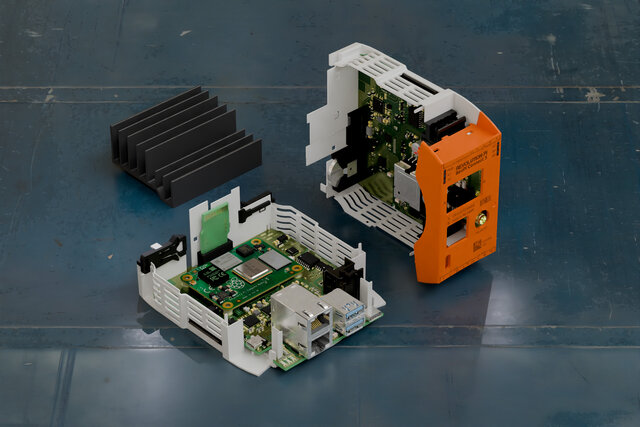
The Revolution Pi takes a Compute Module (CM4) and wraps it in a DIN-rail mountable, EN 61131-2 compliant housing built specifically for harsh manufacturing environments.
| Feature | Consumer Raspberry Pi | Kunbus RevPi (CM4-Based) |
|---|---|---|
| Enclosure & Mounting | Open board / plastic case | IP20 DIN-rail industrial enclosure |
| Operating Temperature | 0°C to 50°C | -20°C to +55°C (or wider) |
| Power Input | 5V DC via USB-C | 24V DC with reverse-polarity protection |
| I/O Isolation | Unprotected 3.3V GPIO | Optocoupler-isolated 24V Digital & Analog I/O |
| Fieldbus Protocols | Requires add-on hats | Built-in Modbus RTU/TCP, PROFINET, EtherNet/IP |
By isolating the computing core from electrical noise, voltage spikes, and ground loops, systems like the RevPi bring the flexibility of open-source Linux into environments traditional PLCs previously dominated.
4. Interfacing with the Real World: Industrial I/O
Standard Raspberry Pi GPIO pins operate at 3.3V logic with minimal current capability and zero electrical isolation—using them directly in a plant environment is a recipe for fried hardware.
To safely interface a CM4/CM5 with industrial sensors and actuators, carrier systems employ:
24V Logic Levels: Standardizing digital signals on 24V DC PNP/NPN inputs and outputs to match factory sensors, limit switches, and solenoids.
Galvanic Isolation: Using optocouplers and digital isolators to prevent noise from motors and high-power drives from entering the compute module.
Serial & Fieldbus Connectivity: Integrating transceiver chips for RS485 (Modbus RTU), CAN bus (CANopen), and dedicated real-time Ethernet protocols.
Analog Signal Processing: Precision ADCs and DACs handling 0–10V and 4–20mA current loop signals for process control sensors.
5. Hardening Software: Embedded Linux Reliability
Hardware durability is only half the battle; software reliability in a 24/7 industrial environment is equally critical. A hard shutdown on a factory floor shouldn’t corrupt the file system.
To build production-grade Linux systems on CM4/CM5, engineers utilize several key techniques:
Read-Only File Systems & eMMC Flash: Replacing consumer MicroSD cards with high-endurance eMMC storage significantly reduces wear. Configuring root file systems as read-only (using overlayfs for volatile data in RAM) prevents file corruption during sudden power loss.
Yocto Project / Buildroot Custom Images: Rather than running full desktop OS distributions (like standard Raspberry Pi OS), engineers compile lightweight, deterministic Linux builds that include only the required drivers and dependencies, drastically reducing memory usage and attack surface.
Hardware Watchdogs: Enabling the Broadcom BCM2711/BCM2712 hardware watchdog timer ensures the system automatically reboots if the operating system or critical application hangs.
Dual-Bank (A/B) OTA Updates: Deploying robust software updating frameworks like RAUC or Mender. These tools maintain two system partitions; updates are flashed to Partition B while Partition A is running. If the update fails health checks upon reboot, the bootloader automatically rolls back to Partition A.
6. Beyond Industry: Compute Modules for Maker & Consumer Electronics
While industrial automation drives large-scale adoption of the Compute Module series, the hardware has also captured the imagination of the maker community and consumer hardware developers.
By eliminating the bulky ports of the standard model, the CM4 and CM5 allow creators to design sleek, custom-built portable electronics that were previously impossible with traditional Raspberry Pi boards.
In an era dominated by closed smartphone ecosystems, open-source hardware developers use Compute Modules to build fully customized, privacy-focused DIY phones and portable “cyberdecks”:
Slim Form Factors: The low-profile board-to-board connectors keep the overall device thickness low enough to comfortably fit in a 3D-printed pocketable enclosure.
Modular Connectivity: By pairing a CM module with mini PCIe or M.2 4G/5G cellular modems and GPS chips, makers can add real-time voice, text, and data capabilities.
Software Freedom: Users run stripped-down Linux operating systems (or mobile builds like PostmarketOS and LineageOS), giving them complete control over their device’s firmware, cellular traffic, and hardware kill-switches.
Whether powering an automated assembly line or serving as the brain of a custom handheld device, the CM4 and CM5 offer unmatched flexibility for any project where space, thermal management, and custom physical interfaces are non-negotiable.
A CM4 gaming handheld, designed with the Switch Lite aesthetics in mind. Contains all STL files and code to build your own landscape retro handheld system. Co-project with Dmcke5.
Conclusion
The Raspberry Pi Compute Module 4 and 5 have successfully bridged the gap between rapid prototyping and industrial deployment. Combined with rugged carrier boards, isolated I/O interfaces, and hardened embedded Linux builds, systems like the Kunbus Revolution Pi prove that ARM-based Linux edge nodes can handle demanding factory automation tasks efficiently and cost-effectively.
Have you every worked with a compute module before? Please share your experience and projects with it in the comments below and don’t forget to check our socials!