Is Raspberry Pi still the best entry point into electronics, or has the field moved on?
Arduino, Beginner, ESP, PiShop, Platforms, Raspberry Pi, Raspberry Pi Pico, Resources, Skills, Troubleshooting, Uncategorized 0
If you ask any tech maker where they started learning electronics over the last decade, there’s a strong chance the answer was either a Raspberry Pi or an Arduino. Since their rise to prominence, these two platforms formed the bedrock of STEM education: Arduino taught beginners how to write C++ to control circuits, while Raspberry Pi introduced them to Linux, Python, and single-board computing.
However, the hardware landscape in 2026 looks vastly different. Flagship single-board computers (SBCs) like the Raspberry Pi 5 push desktop-grade computing power, specialized microcontrollers like the ESP32 and Raspberry Pi Pico W dominate low-power IoT, and hybrid innovations like the Arduino UNO Q are blurring the line between SBCs and microcontrollers entirely.
This raises an important question for beginners: Is a traditional Raspberry Pi still the best entry point for learning electronics, or should you look at modern microcontrollers and hybrid platforms instead?
The Classic Split: SBCs vs. Microcontrollers
To understand where to begin, it helps to distinguish between the two traditional hardware categories: Single Board Computers (SBCs) and Microcontrollers (MCUs).
Single Board Computers
- Runs a full OS (Linux/Debian)
- High computing power, multi-GB RAM
- Handles HDMI, USB, & media
- Operating system overhead can affect precise signal timing
Microcontrollers
- Runs a single compiled program in a continuous loop
- Low power ideal for batteries
- Real-time determinism (microsecond-accurate pin control)
The fundamental trade-off lies in real-time control versus raw computing power. Running a full Linux operating system on a Pi 5 gives you desktop capabilities, but it also introduces background system tasks. If you need a sensor read at exact microsecond intervals or want instant-on battery operation, a standard microcontroller handles it better.
Arduino’s Legacy & The Rise of Hybrid Hardware
For years, the classic advice was simple: Use Arduino (like the UNO R3 or REV4) for reading sensors and driving motors; use Raspberry Pi for networking, databases, and heavy processing.
Arduino built the world’s largest maker community by making electronics approachable through simple C/C++ sketches and the plug-and-play UNO shield ecosystem. But as projects grew more complex, demanding computer vision, local web apps, and machine learning, makers found themselves needing both platforms working together.
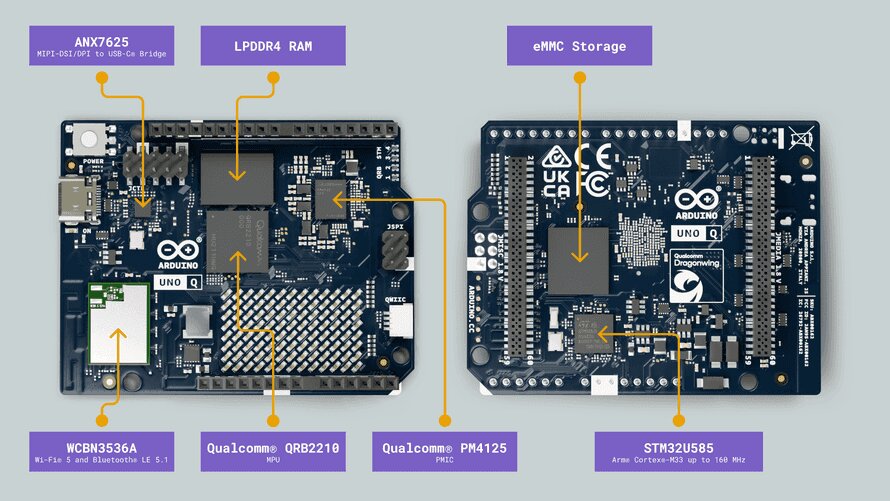
By pairing a Qualcomm Snapdragon-class microprocessor running Debian Linux alongside a dedicated STMicroelectronics ARM Cortex-M33 microcontroller on the classic UNO footprint, the UNO Q eliminates the need to choose between an SBC and an MCU:
Best of Both Worlds: You can run computer vision models or a local web interface on the Linux processor while offloading precise motor timing and sensor polling to the onboard microcontroller.
Unified Development: Using tools like Arduino App Lab, you can write Python scripts for the Linux side and Arduino sketches for the microcontroller side in one integrated workflow.
Comparing Your Options
Depending on your learning goals, the entry point that makes the most sense changes:
Raspberry Pi Pico / Pico W
- Type: Microcontroller
- Best for: Pure electronics basics, MicroPython, Cheap battery-powered sensors
- Extremely Low Cost
- Difficulty Level: Novice
ESP32 Series
- Type: Microcontroller
- Best for: Smart home automation, Wi-Fi/Bluetooth IoT nodes
- Ultra Low Cost
- Difficulty Level: Intermediate
Classic Arduino (UNO REV4)
- Type: Microcontroller
- Best for: Hardware prototyping, learning C++, shield-based robotics
- Low Cost
- Difficulty Level: Beginner-Friendly
Arduino UNO Q
- Type: Hybrid (SBC + MCU)
- Best for: Edge AI, robotics needing computer vision + motor control on one board
- Mid-to-High
- Difficulty Level: Advanced Beginner
Raspberry Pi 4 / Pi 5
- Type: Single Board Computer
- Best for: Desktop PC replacement, Linux learning, media servers, heavy computing
- Mid-to-High
- Difficult Level: Intermediate
How To Choose Your Starting Line

Start with a Pi Pico W, Arduino or ESP32 if: You are on a strict budget, want to build simple circuits, or want to master breadboarding and sensor reading without needing an operating system.
Start with an Arduino UNO Q if: You want to leap straight into modern robotics or Edge AI, combining camera vision and Python-based AI models with real-time hardware pins on a single board.
Start with a Raspberry Pi 5 if: You want an all-in-one platform to learn Linux administration, build media centers, run self-hosted dashboards, or handle complex software development alongside GPIO control.
The Elephant in the Room: The RAM and SSD Price Squeeze
While the market offers more hardware options than ever, makers and budget-conscious builders are facing a new hurdle: steep price increases across memory (DRAM) and storage (NAND flash).
A surging global demand for AI data centers has reshaped the semiconductor supply chain. Top chip manufacturers have shifted production capacity toward high-bandwidth memory (HBM) and enterprise-grade storage to support server infrastructure. As a result, consumer-grade RAM and SSD supplies have tightened, driving component prices up significantly:
System Memory (DDR4 / DDR5): Standard PC RAM kits and memory modules have seen dramatic cost increases, with DDR5 pricing climbing rapidly year-over-year.
Solid-State Drives (NAND Flash): After a period of record-low storage prices, NVMe SSD contracts and retail prices have jumped significantly. A typical 1 TB NVMe drive that was once an easy $50 add-on now costs noticeably more, directly impacting the total cost of building a full setup.
What This Means for Beginner Electronics Projects
These market shifts make choosing the right entry point even more critical:
Microcontrollers offer a budget safe-haven: Because boards like the Raspberry Pi Pico W, Arduino UNO, or ESP32 rely on tiny, integrated onboard memory (SRAM and SPI Flash measured in kilobytes or megabytes rather than gigabytes), their prices remain largely protected from global DRAM and NAND price surges. You can still pick up a feature-rich microcontroller board for the cost of a coffee.
Full Single Board Computers cost more to complete: When buying a flagship SBC like the Raspberry Pi 5, the board itself is only part of the equation. Once you add high-capacity microSD cards, NVMe HATs, fast external SSDs, or opt for higher-RAM models (8GB+ variants), memory inflation noticeably increases the final setup cost.
For beginners who just want to blink LEDs, read sensors, or build basic robotics, starting with a microcontroller is no longer just a gentler learning curve—it is also by far the most cost-effective entry point into electronics today.
Our Verdict
Has the field moved on from the Raspberry Pi? Not away from it, but beyond the idea that one board fits every project.
While a flagship Raspberry Pi 5 remains the premier choice for Linux power users, platforms like the Raspberry Pi Pico have taken over for ultra-budget circuit learning, and hybrid boards like the Arduino UNO Q show where the future is headed, uniting microcontroller determinism and single-board computing under one roof.
Beginners no longer have to pick a single ecosystem—you can choose the exact hardware profile that fits what you want to create.